
How to manage distributed teams for success in 2026

Managing distributed teams in 2026 presents unique challenges that traditional management methods simply cannot address. With US enterprises and startups increasingly relying on remote and hybrid workforces, product managers and hiring managers face coordination barriers, communication delays, and productivity concerns. This guide delivers practical strategies grounded in current data to help you recognize common pitfalls, prepare your infrastructure, execute effective workflows, and verify sustained performance. You will learn how to leverage asynchronous communication, optimize time zone overlaps, and implement tools that drive measurable productivity gains for your managing distributed teams.
Table of Contents
- Understanding Challenges And Preparing For Distributed Team Management
- Essential Tools And Workflows For Effective Distributed Teams
- Scheduling And Communication Strategies Across Time Zones
- Monitoring, Feedback, And Maintaining Productivity In Distributed Teams
- Optimize Your Distributed Teams With Fuerza
- Frequently Asked Questions About Managing Distributed Teams
Key takeaways
| Point | Details |
|---|---|
| Consolidate workflows | Use all-in-one project management tools to increase visibility and reduce context switching across your distributed team. |
| Standardize async communication | Replace excessive meetings with structured asynchronous updates and decision logs to enable smooth handoffs. |
| Leverage time zone overlaps | Schedule critical synchronous meetings during overlapping hours while respecting distributed working schedules. |
| Monitor productivity proactively | Track team health via integrated analytics dashboards to detect risks early and prevent burnout. |
| Combine remote and in-person | Incorporate occasional hybrid sessions to build relationships and reinforce coordination for long-term success. |
Understanding challenges and preparing for distributed team management
Distributed teams face distinct coordination and communication challenges compared to co-located teams. While remote work offers flexibility and access to global talent, it introduces communication delays, cultural differences, and time zone gaps that require specialized management strategies. Product managers and hiring managers must anticipate these barriers and prepare their teams with the right infrastructure and expectations.
Data shows distributed teams produced 45% more code contributions post-pandemic, demonstrating resilience and productivity when managed well. However, success depends on strong tech tools and asynchronous communication practices. A survey of 1,526 US knowledge workers found that async communication and digital tools enable remote work, but in-person interactions remain critical for certain coordination tasks. This explains why hybrid team models are common in 2026, balancing preferences and coordination needs.
To prepare effectively, evaluate your team’s unique coordination requirements early. Consider these factors:
- Identify tasks requiring real-time collaboration versus those suited for asynchronous workflows.
- Assess your team’s existing communication practices and tool proficiency.
- Map time zone distributions to understand overlap windows and potential scheduling conflicts.
- Recognize cultural and language differences that may impact communication clarity.
Pro Tip: Conduct a coordination audit before implementing new workflows to identify bottlenecks and tailor your management approach to your team’s specific needs.
Understanding these challenges positions you to implement targeted solutions rather than applying generic remote work advice. The next step involves selecting tools and workflows that directly address coordination pain points.
Essential tools and workflows for effective distributed teams
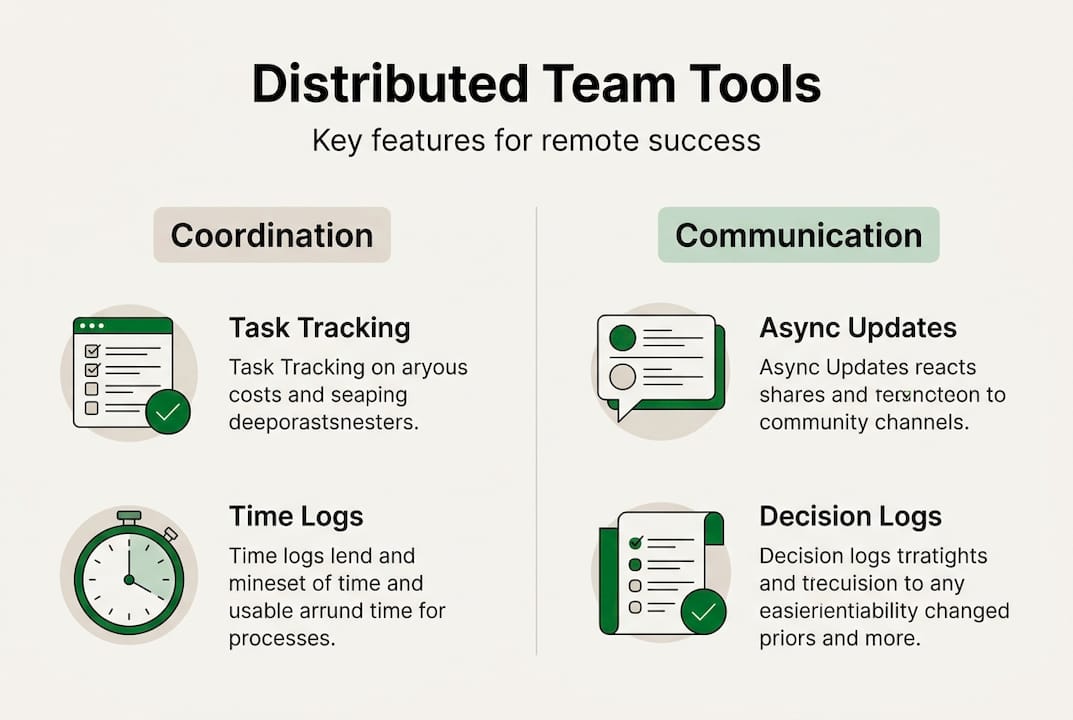
Consolidating project management tasks, time tracking, budgets, and reporting in one platform reduces context switching and improves transparency across distributed teams. All-in-one project management platforms connect these elements for better visibility and early risk detection, enabling managers to spot issues before they escalate.

Standardizing asynchronous updates, decision logs, and lightweight documentation minimizes unnecessary synchronous meetings. Use dedicated asynchronous communication channels like Slack or Wikis instead of email for clarity and searchability. This approach saves time, improves documentation quality, and accommodates team members across time zones.
When selecting tools for your distributed team, compare features that directly support remote collaboration:
| Tool Category | Key Features | Best For |
|---|---|---|
| Project Management | Task tracking, time logs, budget integration, reporting dashboards | Teams needing consolidated workflows and visibility |
| Async Communication | Threaded discussions, searchable history, integrations, decision logs | Reducing meeting overload and improving documentation |
| Video Conferencing | Screen sharing, recording, breakout rooms, calendar sync | Essential synchronous meetings and team building |
| Documentation | Real-time editing, version control, templates, search | Knowledge sharing and onboarding across locations |
Implementing these tools requires thoughtful workflow design. Establish clear guidelines for when to use synchronous versus asynchronous communication. Define response time expectations for async channels to prevent delays. Create templates for recurring updates to maintain consistency.
Pro Tip: Schedule weekly async updates replacing frequent status meetings to save time and improve documentation quality. Team members can contribute updates when convenient, and managers can review them without coordinating schedules.
Integrate your distributed services with these platforms to streamline hiring and onboarding processes. Centralized tools make it easier to bring new team members up to speed quickly, regardless of location.
Scheduling and communication strategies across time zones
Maximizing productivity in distributed teams requires strategic use of time zone overlaps and effective asynchronous communication methods. Identify overlapping work hours for live meetings with minimal disruption to team members. Leverage time zone overlaps for key synchronous meetings and utilize asynchronous workflows in dedicated channels to maintain clarity outside these windows.
Understanding when to use synchronous versus asynchronous communication drives efficiency:
| Communication Type | Benefits | Ideal Use Cases |
|---|---|---|
| Synchronous | Immediate feedback, relationship building, complex problem solving | Sprint planning, brainstorming, urgent decisions, team bonding |
| Asynchronous | Flexibility, documentation, reduced interruptions, inclusive participation | Status updates, code reviews, decision logs, Q&A, announcements |
Follow these best practices for scheduling distributed team meetings:
- Rotate meeting times quarterly to share the burden of off-hours meetings fairly across team members.
- Limit synchronous meetings to essential topics requiring real-time discussion and decision making.
- Record all meetings and share summaries for team members who cannot attend live.
- Use scheduling tools that display multiple time zones to avoid confusion and scheduling errors.
- Block focus time on team calendars to protect deep work periods from meeting overload.
Optimize async teamwork with these tools and channels:
- Use project management platforms for task updates and progress tracking visible to all team members.
- Implement team wikis or knowledge bases for documentation and FAQs accessible anytime.
- Leverage standardizing async communication through dedicated Slack channels or similar tools for topic-specific discussions.
- Create decision logs documenting choices, rationale, and outcomes for future reference.
- Establish video message tools for detailed explanations that benefit from visual context without requiring live attendance.
Pro Tip: Avoid overloading team members with meetings during off-hours to maintain morale and productivity. If a meeting falls outside someone’s normal hours, ensure it is truly necessary and consider recording it for async review.
Effective time zone workflow optimization balances the need for real-time collaboration with respect for individual schedules and work-life boundaries. This approach reduces burnout and sustains long-term team performance.
Monitoring, feedback, and maintaining productivity in distributed teams
Tracking productivity via integrated tools enables managers to detect risks early and gather data-driven insights. Use analytics dashboards to monitor task completion rates, time allocation, and workload distribution across your distributed team. These metrics reveal patterns that indicate potential burnout, resource constraints, or process inefficiencies before they impact deliverables.
Encourage regular feedback loops and decision logs to align expectations and improve processes. Create safe channels for team members to share challenges, suggest improvements, and ask questions. Document decisions with clear rationale so team members understand context and can reference past choices. This transparency builds trust and reduces repeated discussions.
Incorporating occasional in-person or hybrid meetings builds relationships and reinforces coordination. Remote call centers experienced a 10% productivity increase without quality loss, boosted by in-person training for long-term remote success. Face-to-face interactions, even if infrequent, strengthen team cohesion and improve collaboration quality when teams return to distributed work.
Avoid these common monitoring mistakes:
- Tracking activity metrics like hours logged instead of outcomes and deliverable quality.
- Implementing surveillance tools that erode trust and create adversarial relationships.
- Ignoring qualitative feedback in favor of purely quantitative data.
- Comparing individual productivity without accounting for role differences and project complexity.
- Failing to act on early warning signs revealed by monitoring data.
Remote work enables productivity gains when supported by proper training and tools. Organizations that invest in building strong remote work capabilities see sustained performance improvements and higher employee satisfaction.
Pro Tip: Use analytics dashboards to proactively manage team workload and prevent burnout. Set up alerts for unusual patterns like excessive overtime or missed deadlines, then investigate root causes and adjust resources or timelines accordingly.
Combine quantitative monitoring with qualitative feedback to get a complete picture of team health. Regular one-on-one check-ins, pulse surveys, and retrospectives provide context that raw metrics cannot capture. Balance oversight with autonomy to maintain trust while ensuring accountability.
Invest in remote and in-person training to equip your team with skills for distributed collaboration. Training on async communication, time management, and tool proficiency pays dividends in sustained productivity and reduced coordination friction.
Optimize your distributed teams with Fuerza
Managing distributed teams effectively requires not just strong processes but also access to top talent who thrive in remote environments. Fuerza offers AI-powered staffing to hire pre-vetted AI and tech talent specifically suited for distributed teams. Our platform connects you with nearshore and onshore experts who bring the skills and remote work experience your projects demand.
Our staffing services help optimize remote team performance with tailored hiring and management support. Whether you need freelancers, contractors, or full-time team members, Fuerza streamlines the process from sourcing to onboarding. We understand the unique challenges of distributed teams and match you with professionals who excel in asynchronous collaboration and cross-time zone coordination.
Join Fuerza waitlist to access exclusive talent pools and streamline your staffing process. Our Miami-based team specializes in connecting US enterprises and startups with pre-vetted experts who deliver results in distributed environments.
Frequently asked questions about managing distributed teams
How can I maintain team culture in a distributed environment?
Maintain team culture through intentional virtual activities, clear values communication, and regular recognition. Schedule informal video calls for team bonding, celebrate wins publicly in team channels, and create opportunities for cross-functional collaboration. Culture requires consistent effort and cannot rely solely on occasional in-person gatherings.
What is the best frequency for async updates?
Weekly async updates work well for most distributed teams, balancing visibility with minimal overhead. Team members can provide progress summaries, flag blockers, and share wins without daily interruptions. Adjust frequency based on project pace and coordination needs, but avoid daily updates that create reporting fatigue.
How do I handle time zone conflicts effectively?
Rotate meeting times quarterly to distribute the burden of off-hours meetings fairly across team members. Use asynchronous communication for most coordination, reserving synchronous meetings for truly essential discussions. Record all meetings and share detailed notes so team members in conflicting time zones stay informed.
What are signs of productivity decline in remote teams?
Watch for missed deadlines, decreased communication frequency, lower quality deliverables, and increased response times. These patterns often indicate burnout, unclear expectations, or inadequate resources. Address issues promptly through one-on-one conversations and workload adjustments rather than waiting for performance reviews.
Is hybrid work better than fully remote for distributed teams?
Hybrid work offers relationship-building benefits through occasional in-person interactions while maintaining remote work flexibility. Research shows in-person training and periodic face-to-face meetings boost long-term remote productivity. However, fully remote teams can succeed with strong async processes and intentional virtual team building. Choose the model that fits your team’s coordination needs and preferences.
Recommended
- Fuerza — Hire Pre-Vetted AI & Tech Talent | AI-Powered Staffing
- Fuerza — Hire Pre-Vetted AI & Tech Talent | AI-Powered Staffing
- Fuerza — Hire Pre-Vetted AI & Tech Talent | AI-Powered Staffing
- Fuerza — Hire Pre-Vetted AI & Tech Talent | AI-Powered Staffing
- How to Manage Marketing Team for B2B Growth Success - Kadima